
TryRating Maps Work – Complete Beginner’s Guide for India (2026)
Searching for a legitimate work-from-home job that pays in USD or INR? TryRating Maps Work is one of the most popular micro-task jobs available for Indians right now. In this complete guide, we will cover everything you need to know about TryRating Maps jobs – from how to apply, how the work process works, how to easily get selected, how map tasks work, and how to rate each task properly. We have also attached a PDF guide at the end of this article for your reference.Table of Contents
- What is TryRating Maps Work?
- How to Apply for TryRating Maps Jobs
- How the Job Process Works
- How Map Tasks Work – Step by Step
- How to Rate Each Task (Relevance, Name, Address, Pin)
- How to Get Selected Easily
- What You Need Before Starting
- Common Mistakes to Avoid
- Frequently Asked Questions
- Download PDF Guide
What is TryRating Maps Work?
TryRating Maps Work is a micro-task job where you evaluate the quality and relevance of map search results. You work as a search quality rater for companies like TryRating, and your job is to check whether the map results shown to users are accurate and helpful. This work is completely online, flexible, and can be done from anywhere in India. You do not need any special degree – basic computer knowledge and good English skills are enough to start.How to Apply for TryRating Maps Jobs
Applying for TryRating Maps Work is a simple process. Follow these steps to get started:
Step 1: Visit the TryRating Website or Partner Platform
Go to the official TryRating website or the partner platform where the job is listed. You may find the job on platforms like TryRating.com, Lionbridge, or other evaluation company websites.
Step 2: Create an Account
Sign up with your email address and create a profile. Make sure to use your real name and accurate details, as the company will verify your information.
Step 3: Complete the Assessment Test
Most platforms require you to pass an online assessment test. This test checks your ability to understand user intent, evaluate map results, and follow guidelines. Study the guidelines carefully before taking the test.
Step 4: Submit Your Application
After passing the assessment, submit your application with your resume or profile details. Wait for the company to review your application.
Step 5: Start Working
Once your application is approved, you will get access to the rating tool where you can start completing map tasks. You can work at your own pace and earn per task
How the Job Process Works
Once you are selected for TryRating Maps Work, the job process is very simple:
You receive tasks one by one in the rating tool. Each task shows a real user query and one or more map results. Your job is to evaluate how well these results match what the user was looking for. You need to check the query, user location, viewport context, and result details like name, address, and pin placement before giving a rating.
The platform uses a web-based rating interface where each task has a Task ID, estimated rating time, query details, and result panels for scoring. You can work from your desktop or laptop, and there is no fixed schedule – you can complete tasks whenever you have free time.How Map Tasks Work – Step by Step
Map tasks on TryRating combine the user query with location context. Here is how each task works:
Step 1: Understand the Query
Read the user’s search query carefully. Determine what the user is looking for – a specific place, a type of business, or a general category.
Step 2: Check Location Intent
Location intent is divided into two types:
Explicit Intent: The query directly names a place, like “hotels in Vijayawada.” In this case, the query itself controls the expected location.
Implicit Intent: The query does not mention a location, so you must use the user location and viewport signals to infer the expected area.
Step 3: Check Viewport and User Location
The rating tool shows the user location, viewport location, and viewport age. A fresh viewport means the user recently viewed that area, while a stale viewport means the view is old. This affects how you judge distance and relevance.
Step 4: Rate Each Result
After understanding the query and location, rate each result independently based on relevance, name accuracy, address accuracy, and pin placement.How to Rate Each Task (Relevance, Name, Address, Pin)
Rating each task requires you to evaluate four key areas:
- Relevance Rating
Relevance is the most important factor. Each result is rated on a scale from Navigational to Bad:
Navigational: The single most likely result that completely satisfies a distinct intent.
Excellent: A high-quality result that clearly satisfies the user’s intent.
Good: Partially satisfies the intent due to relevance, prominence, or distance issues.
Acceptable: Technically satisfies the intent, but poorly.
Bad: Does not satisfy the user’s intent at all.
If a result is rated Good or below, you must select a demotion reason and write a comment in English explaining your decision.
Pin Accuracy
Pin placement is rated as:
Perfect: Pin falls directly on the rooftop or feature of the POI.
Approximate: Pin is within property boundaries but not on the exact spot.
Next Door: Pin is on the immediate neighboring property on the same street.
Wrong: Pin is outside the allowed area or falls on coordinates 0,0.
Cant Verify: You cannot confirm the exact location with available evidence.How to Get Selected Easily
Getting selected for TryRating Maps Work is not difficult if you follow the right approach. Here are some tips:
Study the Guidelines Thoroughly: Before taking the assessment test, read all the guidelines carefully. Understanding user intent, location logic, and rating rules is essential.
Take Your Time on the Assessment: Do not rush through the test. Read each question carefully and apply the rules you have learned.
Use Reliable Sources for Research: When verifying business details, use official websites, government registries, postal services, and map providers.
Write Clear Comments: When a result is rated Good or below, your comment should clearly explain the reason with a supporting source.
Be Consistent and Accurate: Quality matters more than speed. Focus on giving accurate ratings for every task.
Avoid Common Mistakes: Do not confuse the device icon with user location. Do not rate a closed business as Bad automatically. Always check viewport rules before rating distance.
What You Need Before Starting
Before you start working on TryRating Maps tasks, make sure you have the following:
A Desktop or Laptop: You need a computer with a good display to view maps and details clearly.
Stable Internet Connection: A reliable internet connection is required for loading tasks and submitting ratings.
Good English Skills: You need to understand queries and write comments in English.
Attention to Detail: Each task requires careful review of map results, pins, and business details.
Patience: Map rating work requires focus and accuracy. Do not rush through tasks.
Basic Research Skills: You should know how to use search engines and official websites to verify information.
Name Accuracy (Search 2.0 Tasks)
Rate whether the business name shown matches the real-world name of the place. Use official sources like the business website or government registries to verify.
Address Accuracy
Check if the address shown in the result is correct. Use postal services, official websites, or map providers to confirm the address.
Common Mistakes to Avoid
Many beginners make these mistakes when rating TryRating Maps tasks:
Confusing Device Icon with User Location: The device icon only marks the viewport center, not the user’s actual location. Do not use it for measuring distance.
Automatic Bad Rating for Closed Businesses: Just because a business is closed does not mean it should get a Bad rating. Consider the query and intent first.
Missing Viewport Rules: Fresh vs. stale viewport makes a big difference in how you rate distance. Always check the viewport age before making a decision.
Not Reading the Full Guidelines: Many people skim the guidelines and miss important details. Read them carefully and refer back when unsure.
Rating Pin on Only One Map View: Use multiple map layers inside the tool to verify pin placement. Check satellite, vector, and street views for the most accurate assessment.
Rushing Through Tasks: Taking your time and being accurate will make you stand out as a quality rater. Rushing leads to mistakes and lower ratings.
Frequently Asked Questions
Q: How much can I earn from TryRating Maps Work?
A: Pay varies based on platform and location. Indians typically earn between $10-50 per task. With 5-10 tasks per hour, daily earnings can range from $500-2000+.
Q: Do I need any special degree?
A: No. You only need a good understanding of the guidelines and strong attention to detail.
Q: Can I work from anywhere in India?
A: Yes, as long as you have a stable internet connection and computer.
Q: When do I get paid?
A: Payment schedules vary. Most companies pay weekly or monthly via bank transfer.
Conclusion
TryRating Maps Work is an excellent opportunity for Indians looking for flexible, online, work-from-home jobs. The work does not require any special degree, the pay is reasonable, and you can work at your own pace. The key to success is carefully studying the guidelines, taking time to understand each task, and maintaining high accuracy standards.
Start by applying to the official TryRating website, pass the assessment test, and begin your journey as a map quality rater. With patience, attention to detail, and consistent effort, you can earn a steady income from this job.
Download the complete PDF guide below for detailed step-by-step instructions and best practices.
Apply for Maps Rating Jobs at Peroptyx
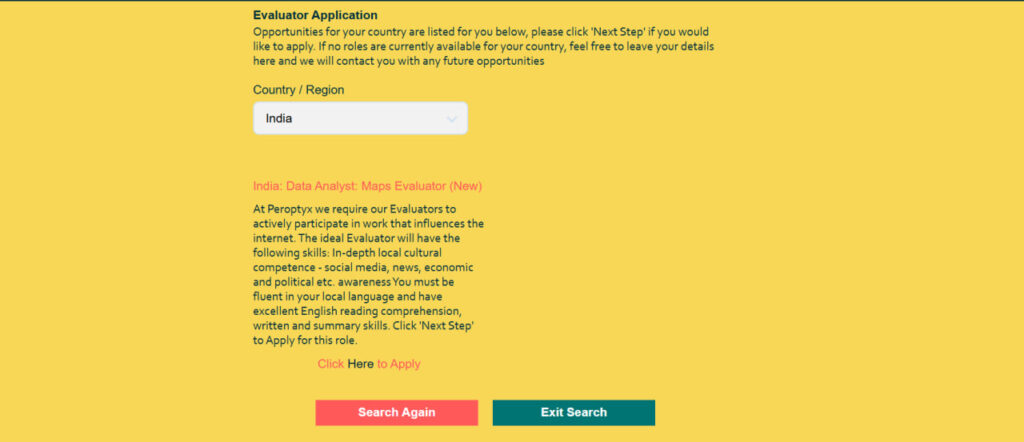
click this link >> Link
To Apply >> Click Here
Peroptyx is a leading provider of location-based machine learning training data and model evaluation solutions. As an Evaluator at Peroptyx, you will rate and improve map search results for major technology companies. The work is completely remote, flexible, and pays competitively. You can work up to 20 hours per week on your own schedule.
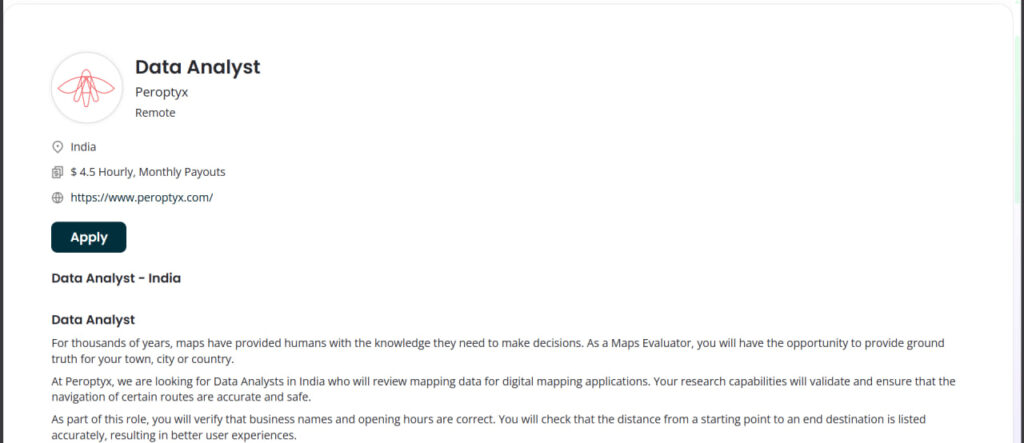
click this link >> Link
Key Benefits:
click this link get the pdf >> Download pdf
- Work from home with flexible hours
- Earn competitive rates per completed task
- Develop valuable research and data evaluation skills
- No prior experience required – training provided
Visit the Peroptyx community page to learn more about working with them and check available opportunities in your country. You can also access your Peroptyx evaluator portal to manage your tasks, timesheets, and payments once you are onboarded.
This is a very helpful and informative guide for beginners looking for work-from-home opportunities like TryRating Maps. The step-by-step explanation of the application process and task rating is clear and easy to understand. It would be even more useful if you could include details about expected earnings and real working hours for Indian users. Thank you for sharing this valuable information.
Okay .I will join the work and it is safe work only or not
Okay . I will join in the work
Iam interested in the work it is safe work or not .. thank you